
In this article, you will explore:
- Microsoft Power Platform
- Microsoft Dataverse
- Dataverse security roles
Introduction to Microsoft Power Platform and Dataverse
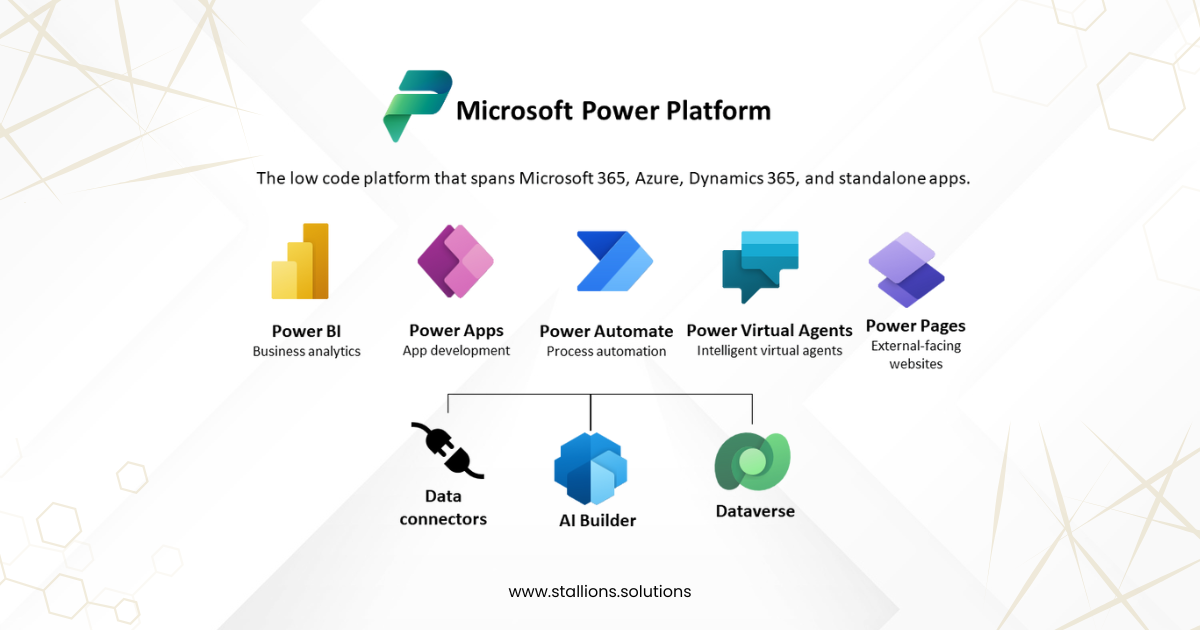
Microsoft Power Platform is a suite of low‑code tools that empowers users to build custom business applications, automate processes, and analyze data. It seamlessly integrates with services such as Microsoft Dynamics 365, Azure, Microsoft Teams, GitHub, and various other Microsoft and third‑party applications.
The platform enables organizations to streamline operations, extract insights from their data, and develop tailored solutions that fit specific business requirements. Because it is designed for users with different levels of technical skills, it allows both professional developers and non‑technical users to create applications and automate workflows with ease.
Microsoft Dataverse is the secure data platform that supports Power Platform applications. It provides a structured way to store and manage business data using tables. Each table is made up of:
- Rows (previously called records)
- Columns (previously called fields or attributes)
Each column holds a specific type of information—for example, a customer’s name, an employee’s age, or a product’s price. Dataverse comes with a set of standard tables designed for common business scenarios, and organizations can also create custom tables to meet unique requirements.
Once data is stored in Dataverse, app makers can use Power Apps including model‑driven apps, canvas apps, and Power Pages to build rich, interactive applications that utilize this data.
Security in Dataverse: Authentication to Authorization
Microsoft Dataverse, the underlying data platform for Power Platform, uses a layered security model that ensures users can work with data safely while minimizing friction. Security can be simple—providing broad access—or highly granular, controlling permissions at the table, record, or even field level.
Here is a high-level overview of how the Dataverse security model functions:
- User authentication is managed through Microsoft Entra ID.
- Licensing acts as the first gate, determining whether a user can access Power Apps features.
- Environment-level security roles control who can create apps, flows, and other components.
- App sharing determines user access:
- Canvas apps are shared directly with users or Microsoft Entra groups, but remain governed by Dataverse security roles.
- Model-driven apps are shared strictly by assigning Dataverse security roles.
- Environments act as security boundaries, allowing different configurations for different departments or teams.
- Canvas apps and Power Automate flows rely on connectors, and permissions depend on the credentials and entitlements associated with each connection.
- Environments with Dataverse enabled support advanced security controls for managing table-level and record-level access.
- Only a Dataverse System Administrator can manage environment-level security settings.
When to Use Dataverse
Standard and custom tables in Dataverse offer a secure, cloud‑based solution for storing your organization’s data. These tables define the structure of your business data and can be used directly within your applications. Dataverse is an excellent choice for the following reasons:
- Easy to manage – Both metadata and data are stored in the cloud, so you don’t need to worry about storage infrastructure or maintenance.
- Easy to secure – Dataverse provides robust security. Users can access data only when they have been given proper permissions. Role‑based security makes it simple to control table access for different roles within your organization.
- Access to Dynamics 365 (D365) data – Since D365 apps store their data in Dataverse, you can quickly build applications that use and extend this data through Power Apps, whether model‑driven or canvas.
- Rich metadata support – Dataverse integrates data types and relationships directly with Power Apps, enabling seamless app development.
- Built‑in logic and validation – Features such as calculated columns, business rules, workflows, and business process flows help ensure data accuracy and guide business operations.
- Productivity tools – Tables can be accessed through Microsoft Excel add‑ins, improving efficiency and making data easier to work with.
It is generally recommended to use existing standard tables (previously known as entities) in Dataverse and tailor them to your needs by adding columns or configuring settings. Examples of common standard tables include:
- Customer tables – Such as Account, Contact, and Customer Address.
- Activity table – Represents tasks or calendar-like events with fields such as start time, end time, due date, and duration.
- Annotation (Notes) table – Can also store files and attachments.
- User table – Represents your organization’s internal users and is used to assign record ownership.
5 Predefined Security Roles
Dataverse provides a set of predefined security roles that help control user permissions and ensure proper access management. Below are five key roles you should be familiar with:
Environment Admin
Users with this role have complete administrative privileges within the environment. They can manage all security roles including Environment Admin and Environment Maker provision the Dataverse database, and access every table and dataset, whether standard or custom.
Environment Maker
This role allows users to create resources such as apps, flows, pages, custom connectors, and custom APIs. However, Environment Makers do not have permission to view or access data or tables stored in the environment.
System Administrator
A highly privileged role, the System Administrator has full authority over both administration and customization. Users with this role can create, edit, and assign security roles, and they have complete, unrestricted access to all data and tables in the environment.
System Customizer
System Customizers have extensive customization permissions but limited data access. They can modify any standard or custom table, but they can only view records they create within the Account, Contact, and Activity tables.
Basic User
This is the most limited of the predefined roles. Basic Users can run apps shared with them and can read data from standard tables, but their access is significantly restricted compared to other roles.
Note:
The System Administrator role provides full control over customizing and managing the environment. Users with this role can create, edit, and assign security roles and have complete visibility into all data and tables within the environment.
When creating custom roles, it is recommended to use the System Customizer role as a starting point. From there, remove any privileges that would allow users to update (“patch”) related tables through a Power Apps Canvas App front end.
Security Role Scopes
Security roles in Dataverse can be applied at different levels, allowing flexible and granular access control:
- Organization – Grants access across the entire environment to all users.
- Business Unit – Ensures access is limited to a specific top‑level business unit, which can also contain child business units.
- Parent: Child Business Unit – Provides access to a business unit and all of its associated child units.
- User – Assigns permissions directly to an individual user, determined by their role and license.
Conclusion
Dataverse uses role‑based security to manage permissions and access effectively. Security roles can be assigned to individual users or applied at the team or business‑unit level. Assigning roles to teams simplifies access management, any user added to the team automatically inherits the team’s permissions. This structured approach allows organizations to maintain strong data protection while ensuring flexibility in how user access is managed.