

If you’re working with Microsoft Dynamics 365 Finance and Operations, you’ve likely faced challenges in accessing data or building automations without diving into complex coding. Now, those hurdles are easier to overcome thanks to Microsoft Copilot Studio.
With its low-code AI for Dynamics 365 F&O, Copilot Studio empowers users to create intelligent, conversational agents that seamlessly interact with D365 F&O without writing a single line of X++ code. From automating data retrieval and triggering Power Automate flows to enhancing customer interactions, this tool helps you achieve more with less effort.
In this article, we’ll uncover how Microsoft Copilot Studio, combined with Dynamics 365 Finance and Operations, unlocks new possibilities for efficiency and innovation.
What is Microsoft Copilot Studio? Let’s Understand this Platform
Microsoft Copilot Studio is a low-code development solution from Microsoft that empowers businesses to build intelligent AI assistants (Copilots) tailored to their unique needs.
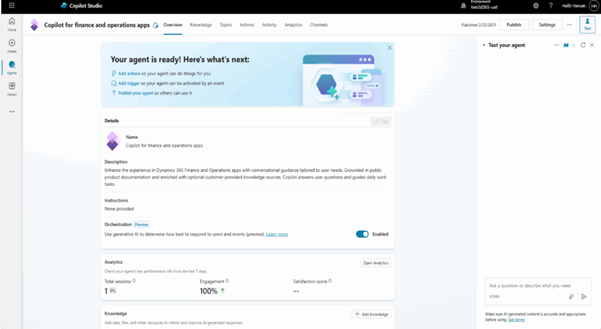
Some key capabilities include:
- Visual interface for designing workflows and automations.
- Seamless integration with Power Automate and external APIs.
- Effortless customization by adding topics that directly interact with Microsoft Dynamics 365 Finance and Operations.
- Instant publishing of topics for real-time user access.
Features and Capabilities of Microsoft Copilot Studio
Below are some of the key features and capabilities offered by Microsoft Copilot Studio:
Adding Knowledge Sources in Microsoft Copilot Studio
Microsoft Copilot Studio allows knowledge sources to work alongside generative answers, enabling agents to deliver more accurate and helpful responses. By adding knowledge sources, agents can pull data from platforms like Power Platform, Dynamics 365, websites, and other external systems. These sources can be integrated during agent creation, after setup, or directly within a topic using a generative answers node.
Supported Knowledge Sources
You can connect the following types of knowledge sources:
- Public Websites: Allows the agent to search queries using Bing and return results exclusively from specified URLs.
- SharePoint: Connects to a SharePoint URL and uses GraphSearch to provide relevant results.
- Dataverse: Retrieves data from your configured Dataverse environment using retrieval-augmented generation.
- Documents: Searches documents uploaded to Dataverse and returns content from them.
- Enterprise Data via Copilot Connectors: Accesses organizational data indexed by Microsoft Search.
Generative Answers Using Knowledge Sources
By default, Microsoft Copilot Studio provides a “Conversational Boosting” topic that includes a generative answers node. This node automatically leverages all knowledge sources added at the agent level. Generative answers minimize the need to create individual topics for every question, significantly accelerating manual deployment.
Authentication
When accessing sources like SharePoint, Dataverse, or other enterprise data, the agent uses Microsoft Entra ID for authentication. This ensures that users can only view content they are authorized to access.
The Role of Actions in Microsoft Copilot Studio
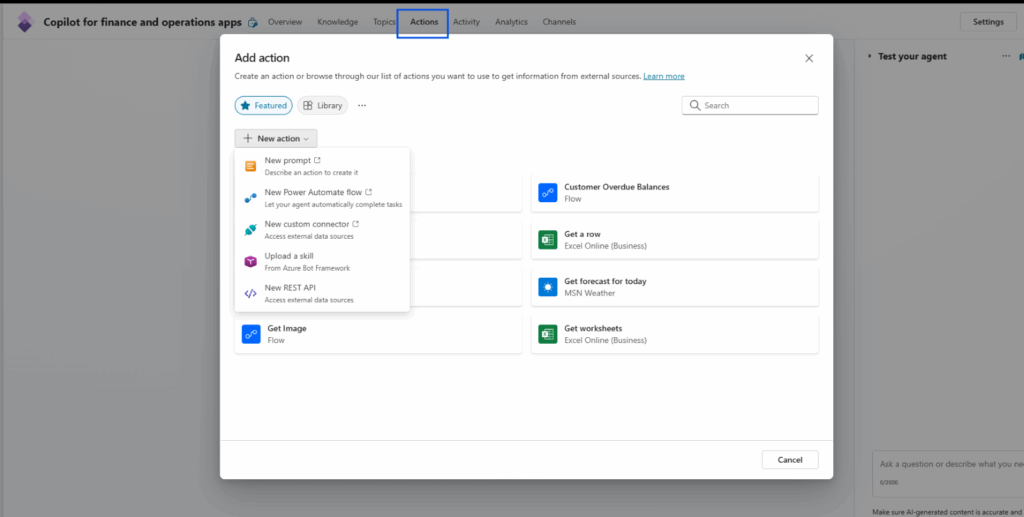
In Microsoft Copilot Studio, actions enable your Copilot to integrate with external systems and services. They facilitate real-time data retrieval, automate processes, and deliver AI-powered responses.
Types of actions available in Copilot Studio
The way your Copilot interacts with external systems, such as Dynamics 365 Finance & Operations (D365 F&O), depends on the actions you configure. Below are some supported action types:
- Prebuilt Connector Actions – Leverage Microsoft’s built-in connectors to seamlessly integrate with services like Dataverse, SharePoint, and more.
- Custom Connector Actions – Connect to your own APIs by creating custom connectors tailored to your business needs.
- Power Automate Flows – Automate and orchestrate business logic using Power Automate. Ideal for triggering multi-step workflows or approval processes.
- AI Builder Prompts – Generate dynamic, AI-driven responses. Perfect for summarizing content, extracting insights, or providing intelligent suggestions.
- Bot Framework Skills – Extend Copilot’s capabilities with custom skills built using the Bot Framework. Best for handling complex conversations or modular logic.
- REST API Calls – Execute direct API calls to internal or third-party systems, including D365 F&O, giving you full control over request and response handling.
Dynamics 365 F&O and Copilot Studio: What does this integration enable?
Integrating Microsoft Dynamics 365 for Finance and Operations (F&O) with Microsoft Copilot Studio opens powerful AI-driven experiences by combining enterprise data with natural language interaction. Here’s how it works and why it matters:
- Custom AI tools: You can build AI tools that tap into F&O business logic using X++ code, then expose them as Copilot tools via Dataverse APIs.
- Natural language interaction: Users can ask questions like “What’s the current balance for customer Contoso?” and Copilot will invoke backend logic to calculate and return the answer.
- Embedded and sidecar experiences: Copilot can appear as a side panel (sidecar) or be embedded directly into F&O apps, offering contextual help, summaries, and task automation.
Conclusion
Microsoft Copilot Studio bridges the gap between Dynamics 365 Finance & Operations and end users by offering an intuitive, low-code platform for creating conversational AI experiences. This approach simplifies data access, minimizes manual effort, and empowers teams to make faster, smarter decisions.
Ready to transform how your organization works with Dynamics 365 F&O? Contact us at support@stallions.solutions.
