

Enterprise SharePoint teams are expected to deliver solutions quickly while keeping everything stable, secure, and consistent. As environments become more complex, this pressure increases. Copilot has made SharePoint development faster by helping teams build SPFx components, Power Automate workflows, and custom integrations more quickly. However, Copilot does not remove the responsibility of running a well-governed and scalable platform.
This is where many organizations start to face challenges. Copilot speeds up development, but it also exposes issues that were easier to ignore before such as weak architecture standards, unclear review processes, and unclear ownership. Teams work faster, but it becomes harder to maintain control. Code quality becomes uneven. Citizen developers begin creating more without proper guidelines. The risks increase slowly, often becoming noticeable only when they are costly and difficult to fix.
Copilot for SharePoint development works best when strong engineering practices and a clear operating model are already in place. This is usually the moment when organizations look for outside help not to set up Copilot itself, but to improve their SharePoint development framework so it remains governed, maintainable, and scalable over time. This article explains what enterprise teams typically do well, what they often struggle with when using Copilot, and when support from experienced SharePoint consultants becomes necessary to keep moving fast without losing control.
What Enterprise Teams Get Right with Copilot for SharePoint Development
Enterprise teams that succeed with Copilot for SharePoint development treat it as a tool that speeds up delivery, not something that replaces engineering expertise. They know when to let Copilot accelerate work and when human review is essential.
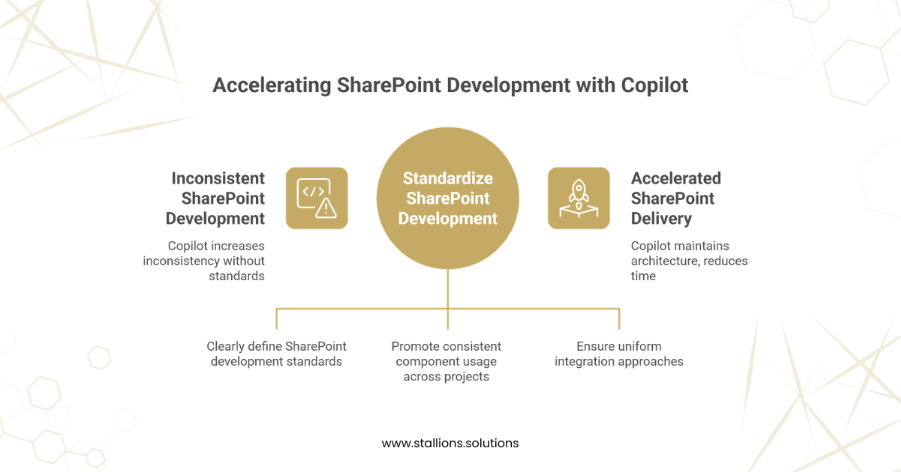
They standardize before increasing speed
Teams that get strong results from Copilot already have clear SharePoint development standards. Their SPFx patterns are documented, component libraries are reused, and integration methods are consistent across projects. Because of this foundation, Copilot produces code that fits their existing approach.
Without these standards, Copilot can increase inconsistency. With them, Copilot helps maintain good architecture while reducing delivery time.
They keep code ownership and decision-making clear
Effective teams make accountability explicit. Copilot may generate parts of the code, but senior developers and platform lead still make key design decisions. Code reviews remain required. AI-generated code is reviewed just like human code, checking for security, performance, and maintainability. This prevents Copilot from becoming an untracked contributor and ensures all engineering decisions remain supervised.
They separate productivity from governance
Successful teams do not let faster development weaken governance. Copilot boosts productivity, but decisions about permissions, data access, and deployment approvals are still handled carefully and centrally. They define where Copilot can help and where human controls must stay in place.
This balance allows development speed to rise without creating security or compliance risks.
They align Copilot with their overall SharePoint operating model
Teams that manage this well make Copilot part of their existing structure. Platform owners set limits. Engineering teams know how and when to escalate issues. Citizen developers can use Copilot but within defined boundaries. Copilot becomes a controlled part of the operating model, not an uncontrolled add-on.
Where consulting support helps
Many organizations start using Copilot before they have strong standards and governance in place. This is where SharePoint consulting support becomes valuable. Not to install or configure Copilot, but to help teams build better development standards, strengthen governance, and redesign workflows so that faster delivery stays predictable and manageable.
Where Enterprise Teams Get It Wrong with Copilot for SharePoint Development
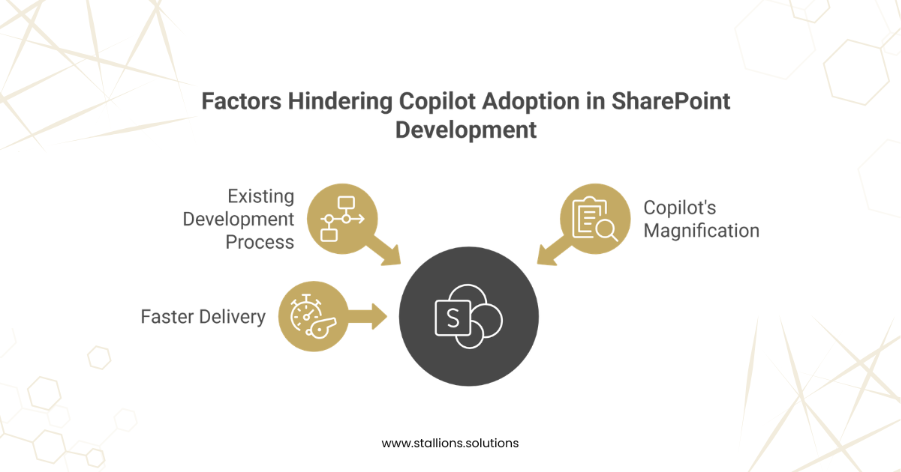
Most enterprise SharePoint teams do not struggle with Copilot because the tool is flawed. They struggle because Copilot exposes weaknesses that were already present in their development process. When delivery gets faster, gaps become easier to see. Copilot magnifies the strengths and weaknesses of whatever operating model teams already have.
They confuse speed with maturity
A common mistake is assuming that faster delivery means they are improving. Copilot helps generate code, create integrations, and build components faster, but it does not check whether the architecture is correct. Teams release more often, but if they do not follow consistent patterns, their solutions start drifting apart.
Over time, this causes fragmented SPFx builds, repeated logic, and higher rework costs. What feels like fast progress at first turns into instability later.
They assume AI-generated code is safe
Some teams review AI-generated code less strictly than code written by developers. This creates hidden problems. Copilot might introduce inefficient queries, insecure defaults, or patterns that do not match enterprise standards. Without proper review, these issues reach production quietly. Security risks do not usually show up immediately. They grow slowly over multiple releases, becoming expensive to fix later.
They mix up citizen development with platform ownership
Copilot makes SharePoint development easier, which can be beneficial when managed well. The mistake happens when teams allow more people to build solutions without clear rules. Citizen developers start creating workflows or extensions in shared environments without knowing who to escalate issues to or who owns what.
This creates conflict between business users and IT teams, slows approvals, and increases risk. The problem is not giving more people access; it is doing so without boundaries.
They wait too long to put governance in place
In many companies, governance happens only after problems appear. Copilot adoption moves ahead quickly, but standards, review processes, and deployment controls are added later. When issues finally surface, rushed governance slows teams down and frustrates everyone. By the time controls are added, fast delivery has already created technical debt that is hard to unwind.
Why these mistakes lead to external support
These issues rarely appear in isolation. They show up across multiple teams and projects. Leaders see the symptoms but fixing underlying problems while still delivering new work becomes difficult.
This is often when organizations turn to experienced SharePoint consultants. The goal is not to fix individual solutions, but to stabilize the entire development model, bring back consistency, and ensure Copilot increases speed without increasing long-term risk.
Final Words
Copilot has changed the way SharePoint solutions are created, but it has not changed what enterprises are responsible for. Faster development still requires strong architecture, consistent standards, and clear ownership. In many cases, the need for these foundations has become even more important as delivery speeds up.
Teams that use Copilot successfully do not expect the tool to fix deeper issues. They update their development approach, strengthen governance, and make clear where human judgment is required. Teams that struggle usually move quickly without redefining responsibilities, which leads to growing inconsistency and hidden risks across projects.
This is where experienced SharePoint consulting support becomes valuable. Aligning AI-powered development with enterprise governance needs more than basic setup. It requires a defined operating model, disciplined processes, and an understanding of how faster delivery affects long-term platform health.
If your SharePoint environment is delivering work faster but feels harder to manage, it may be the right time to reassess your approach to Copilot. Reach out to our team to discuss how we can help.
