
A seller wants to know why a big deal has gone quiet. To find out, they open the CRM, check the activity timeline, switch to their inbox to review the last few emails, review the meeting notes, and then try to remember what the customer said on the call.
Twenty minutes later, they have a picture, and no follow-up has been sent yet.
Service reps do the same dance with cases. They read the history, search for the right article, work out what’s being asked, and draft a reply. Most of the time is spent gathering context, not helping the customer.
In early October 2026, Microsoft added 30 pre-built Dynamics 365 skills for Copilot Cowork, aimed squarely at that problem.
This post covers what they do, what you need to switch them on, and what we’d check before rolling them out to a team. If you haven’t met Cowork yet, start with our guide to Copilot Cowork.
Why Reps Keep Leaving the CRM
The CRM is meant to be where customer work happens. Much of that work happens in email, Teams, and meetings, while the CRM sits to one side, waiting to be updated.
Microsoft is trying to close that gap, and it has a name for the approach, agentic, headless CRM. Customer data and business logic remain in Dynamics 365, while the work itself moves to Copilot and Teams, where people already spend their day.
Microsoft’s own post says the aim is to bring customer context, expertise and actions straight into those places, and you can read it on the Microsoft Copilot blog.
What Microsoft Has Just Added
The new package covers 30 skills across Dynamics 365 Sales, Customer Service and Customer Insights. Microsoft’s announcement says they work with more than 180 generally available tools across those products.
The difference between tools and skills is worth clarifying. Tools come from Dynamics 365 MCP servers and enable Copilot to read and act on CRM data. Skills are reusable, task-specific guidance on how to use those tools to complete a job, so no one has to write every workflow from scratch.
We explained the underlying protocol in our guide to the Dynamics 365 ERP MCP server, and the CRM skills build on the same idea.
Availability depends on the experience. The skills are generally available in Cowork, available through the Frontier programme in Code, and in private preview in Autopilot. Keep that in mind if someone tells you it’s switched on everywhere.
What the Sales Skills Do
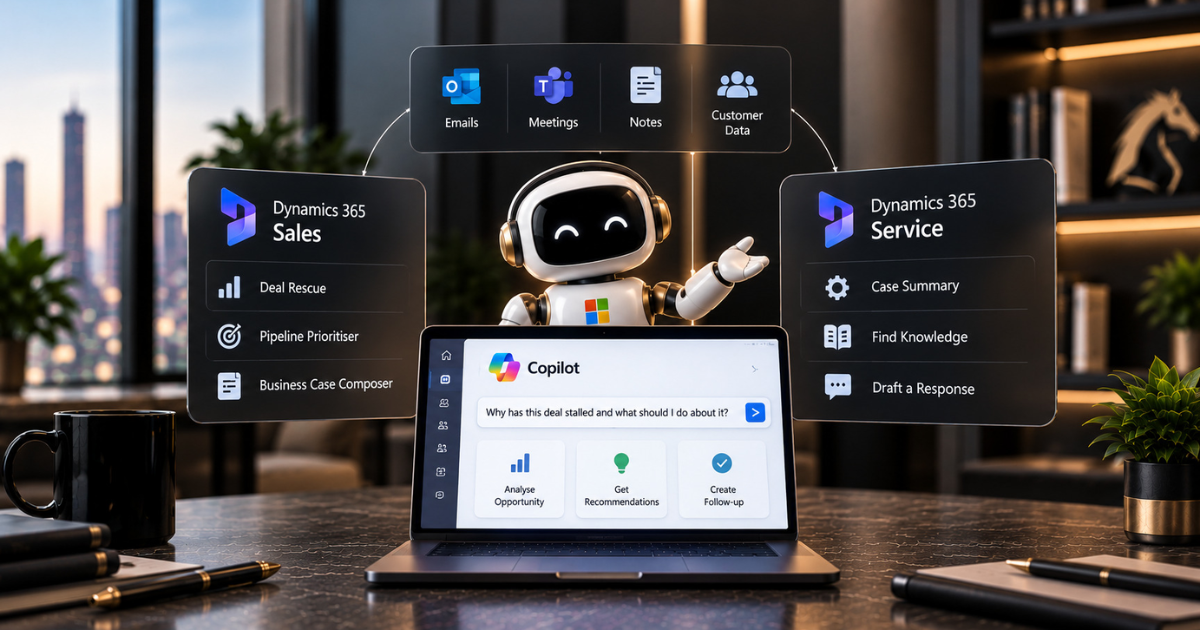
Sales skills are built on the questions sellers ask most often. Named examples include Deal rescue, Pipeline prioritiser and Business case composer, among others.
The seller still asks in plain English, for example, “Why has this deal stalled, and what should I do about it?”
Cowork then works through the steps, drawing on CRM data, email, meetings and files, and returns a result for the seller to review.
We covered the assistant side of selling in our guide to Copilot for Sales, and our piece on the Sales Development Agent deals with the prospecting end.
What the Service Skills Do
Service teams gain skills in case triage, answer research, and drafting customer replies. A rep can ask Cowork to work through a customer’s case history, research an answer from verified knowledge, and draft a response, all in one place.
There’s a sensible limit built in. The draft goes to a person for review, and answers are meant to come from verified knowledge rather than whatever the model happens to remember.
That’s why your knowledge base matters so much, a point we made in our guide to implementing agentic AI in Dynamics 365 Customer Service.
How Delegation Actually Works
The pattern is the same for both teams. A user hands Cowork a task with several steps. Cowork splits it into stages, pulls data from the relevant systems, and returns a result for review.
Microsoft has also added Sales and Service plugins to Cowork’s Roles and Industry library, so teams start with ready-made workflows for their role rather than a blank prompt.
Cowork’s event-driven tasks can pick up work when an email or Teams message arrives, so a person doesn’t always have to start the task. To see the bigger picture of what Cowork can do, read Microsoft’s Cowork update.
What You Need in Place
The licensing is more specific than the headlines suggest, so read it before promising anyone access.
Partner guidance states that the full set of sales skills requires a Dynamics 365 Sales Enterprise or Sales Premium licence, plus a licence that provides access to Microsoft Copilot.
Service skills require a Dynamics 365 Customer Service licence, access to Cowork, and the appropriate permissions in the relevant environment and on the relevant records.
To switch the skills on, an administrator enables them in the customisation area of the relevant Copilot experience, connects the appropriate accounts, and selects a Dynamics 365 environment when prompted.
Cowork, Code and Autopilot also run on Copilot Credits in addition to the per-user licence, so someone should own that budget.
We haven’t included figures because rates and terms change. Confirm the current position with your Microsoft partner.
Questions to Ask Before You Roll It Out
Thirty ready-made skills sound reassuring, but they merit the same scepticism as any new tool.
One analyst note on the launch said that nothing published so far demonstrates how good the skills are, and that’s a fair point.
Microsoft hasn’t released accuracy data for them, so the sensible move is to measure it yourself. Pick a small group, give them real tasks, and have someone review the output. Our guide to the Sales Bench shows how to build a simple scorecard for exactly that.
Ask who can see what, too. Cowork works with the permissions a user already has, so loose CRM permissions become a bigger risk once an agent can read across email, files and customer records.
We covered the identity side in our guide to securing AI agents with Microsoft Entra ID, and the wider principles are in our piece on responsible AI in practice.
Final Thoughts
The new skills take a lot of everyday CRM work out of the CRM, which is the right direction. Reps spend less time gathering context and more time acting on it.
Whether they help depends on the groundwork: clean customer data, sensible permissions, a knowledge base people trust, and a small pilot that demonstrates results on your own cases.
If you’d like a hand with that, our AI Enablement Programme takes teams from a first experiment to production without the usual false starts.
As an ISO 27001-certified Microsoft partner, we ensure governance is in place before an agent accesses live customer data.
Book a free assessment, and we’ll tell you honestly where to begin, no hard sell.
Frequently Asked Questions
What are the Dynamics 365 CRM skills in Copilot Cowork?
They’re 30 pre-built skills across Dynamics 365 Sales, Customer Service and Customer Insights, providing Cowork with reusable guidance for completing sales, service and marketing tasks with Dynamics 365 tools and data.
Are the skills generally available?
They’re generally available in Cowork, available through the Frontier programme in Code, and in private preview in Autopilot. Check which experiences your team will use.
What licences do we need?
Partner guidance states that sales skills require Dynamics 365 Sales Enterprise or Premium, plus a licence with Copilot access, whereas service skills require a Dynamics 365 Customer Service licence, access to Cowork, and the appropriate permissions.
Do the skills cost extra?
Cowork, Code and Autopilot are billed in Copilot Credits, in addition to the per-user licence. Confirm current rates and terms with your Microsoft partner.
Do we still need a human to check the output?
Yes. The workflow returns a result for the person to review, and answers are intended to be based on verified knowledge. Run a pilot and review the results before a wider rollout.
